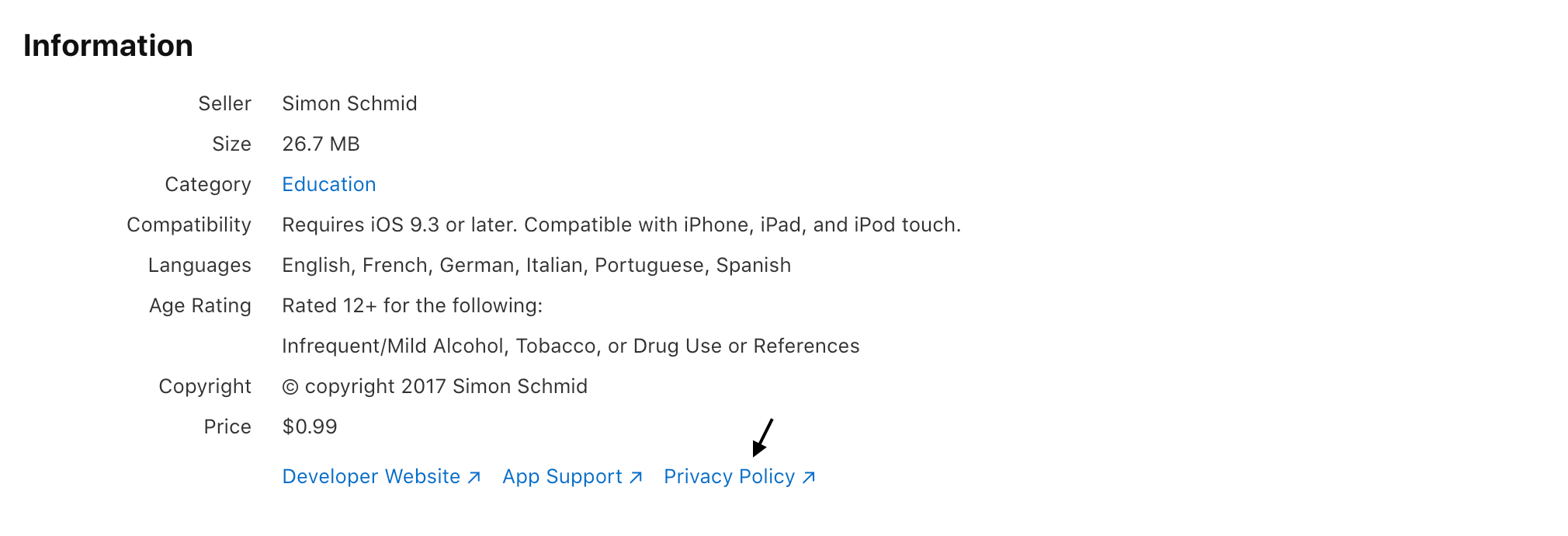

Vanaf de release van iOS 8 heeft Apple meerdere eisen ingevoerd waaraan moet worden voldaan om te voorkomen dat je app-aanvraag wordt afgewezen. Een van de belangrijkste eisen (waardoor apps vaak worden afgewezen als niet aan de voorwaarden wordt voldaan) gaat over gegevensbescherming.
Data privacy is more important than ever across various companies and platforms; with major fines and sanctions being handed down for non-compliance, companies are paying attention – and Apple is no exception: Apple’s App Store Review Guidelines have been updated to better accommodate recent changes in Data Protection Law.
From October 3, 2018 App Store Connect requires a privacy policy for all new apps and app updates before they can be submitted for distribution on the App Store or through TestFlight external testing.
Vanaf 3 oktober 2018 vereist App Store Connect een privacybeleid voor alle nieuwe apps en app-updates.
Artikel 5.1 van de App Store-richtlijnen van Apple, de Review Guidelines, geeft een overzicht van de richtlijnen over gegevensbescherming van Apple (op grond waarvan je app kan worden geweigerd). Artikel 5.1.1 over Gegevensverzameling en -opslag specificeert verder:
5.1.1(i) Privacybeleid: Alle apps moeten beschikken over een gemakkelijk te raadplegen link naar hun privacybeleid in het App Store Connect-metagegevensveld en in de app zelf. Het privacybeleid moet duidelijk en uitdrukkelijk:
- aangeven welke gegevens, indien van toepassing, de app/dienst verzamelt, hoe de gegevens worden verzameld en waarvoor ze worden gebruikt.
- bevestigen dat alle derden met wie een app gebruikersgegevens deelt (in overeenstemming met de richtlijnen), zoals analysetools, advertentienetwerken en SDK’s van derden, evenals alle moeder-, dochterondernemingen of andere gerelateerde entiteiten die toegang hebben tot gebruikersgegevens, dezelfde of gelijkwaardige bescherming van gebruikersgegevens bieden als vermeld in het privacybeleid van de app en als vereist door deze richtlijnen.
- het beleid voor het bewaren/verwijderen van gegevens uitleggen en beschrijven hoe een gebruiker de gegeven toestemming kan intrekken en/of om verwijdering van de gegevens van de gebruiker kan verzoeken.
Bovendien kun je de link of tekst van het privacybeleid van je app alleen bewerken wanneer je een nieuwe versie van je app indient. Lees hier de privacybepalingen van de App Store.
Starting with iOS 14.5, new requirements will go into effect, that will make data collection and processing more transparent for users. You must:
- Answer privacy questions in App Store Connect, to explain how you handle users’ data and which third-parties are involved. This will provide users with relevant information on:
- the types of data you or third-party partners collect, unless the data meets all the criteria for optional disclosure;
- how their data may be used;
- your privacy policy.
- Use the AppTrackingTransparency framework to obtain the users’ permission to track them or to access their device’s advertising identifier. The AppTrackingTransparency framework will:
- Present an app-tracking authorization request to the user: the prompt contains a purpose string that explains why you’d like to track the user.
- Provide the tracking authorization status. Unless you receive permission from the user to enable tracking, the device’s advertising identifier value will be all zeros (meaning that you cannot not track the user).
Vereisten voor privacybeleid voor iOS/macOS-apps
Veel mensen vragen om een voorbeeldprivacybeleid voor apps. Wat precies in een privacybeleid moet staan, hangt af van de toepasselijke wetgeving en moet wellicht voldoen aan vereisten over geografische grenzen en rechtsgebieden heen.
For this reason, it’s always advisable that you approach your (legally mandated) privacy policy with the strictest applicable regulations in mind. You can read more about determining your law of reference here or read our in-depth Legal Overview Guide here.
Laten we beginnen met de wettelijke minimumeisen. Dit zijn de belangrijkste basiselementen die een privacybeleid moet bevatten:
- Who is the app owner?
- What data is being collected? How is that data being collected?
- What is the Legal basis for the collection? (e.g consent, necessary for your service, legal obligation etc.) – This is more specifically related to the GDPR and EU Law, however, even if you fall outside of GDPR obligations, it’s likely that under many other legislations, you’ll still need to say why you’re processing the personal data of users.
- For which specific purposes are the data collected? Analytics? Email Marketing?
- Which third parties will have access to the information? Will any third party collect data through widgets (e.g. social buttons) and integrations (e.g. Facebook Connect)?
- What rights do users have? Can they request to see the data you have on them, can they request to rectify, erase or block their data? (under European regulations most of this is mandatory)
- Description of process for notifying users and visitors of changes or updates to the privacy policy
- Effective date of the privacy policy
Voorbeeld van een privacybeleid voor iOS/macOS-apps
Here’s an example of privacy policy for an iOS app, created with our generator.
Terms and Conditions for Mobile Apps
Terms and Conditions (also called ToS – Terms of Service, Terms of Use or EULA – End User License Agreement) set the way in which your product, service or content may be used, in a legally binding way. Not only are crucial for protecting you from potential liabilities, but (especially in cases where something is being sold to consumers) they often contain legally mandated information such as users’ rights, withdrawal or cancellation disclosures.
In general, you’ll likely need to set Terms and Conditions if you have an app that participates in some form of commerce (whether selling to users directly or facilitating trading). Additionally, some specific instances where they might be needed are where you:
- need to make legally required disclosures related to consumer rights (especially withdrawal and cancellation rights);
- have different user levels (eg. registered vs non-registered);
- your platform allows users to sell or trade with other users;
- facilitate or otherwise process payments and/or other sensitive user data;
- want to set the rules for user behavior and state grounds for termination of accounts;
- participate in affiliate programs;
- provide a software or service which can potentially cause harm if misused;
- would like to have some legally enforceable control over, and set rules about, how your app may be used.
Particular emphasis should be given to account termination clauses, payment conditions and the limitation of liability clauses (and disclaimers).
Our Term and Conditions Generator helps you to easily generate and manage documents that are engineered to meet the specific requirements of all major app stores and up to date with the main international legislations.
Zo voeg je een privacybeleid toe aan je iOS/macOS-app
iubenda makes solving this issue easy: With hundreds of available clauses, our privacy policies contain all elements commonly required across many regions and services, while applying the strictest standards by default – giving you the option to fully customize as needed.
Ons beleid is opgesteld door juristen, wordt door onze juristen bijgehouden en wordt op onze servers gehost om ervoor te zorgen dat het altijd is bijgewerkt overeenkomstig de meest recente wetswijzigingen en vereisten ten aanzien van derden.
Het proces is eenvoudig en intuïtief. Zo ga je te werk:
- click to add your services;
- fill out your web/app owner and contact details;
- embed.
Click here to read the full guide on how to generate a Privacy Policy.
1. Voeg je diensten toe
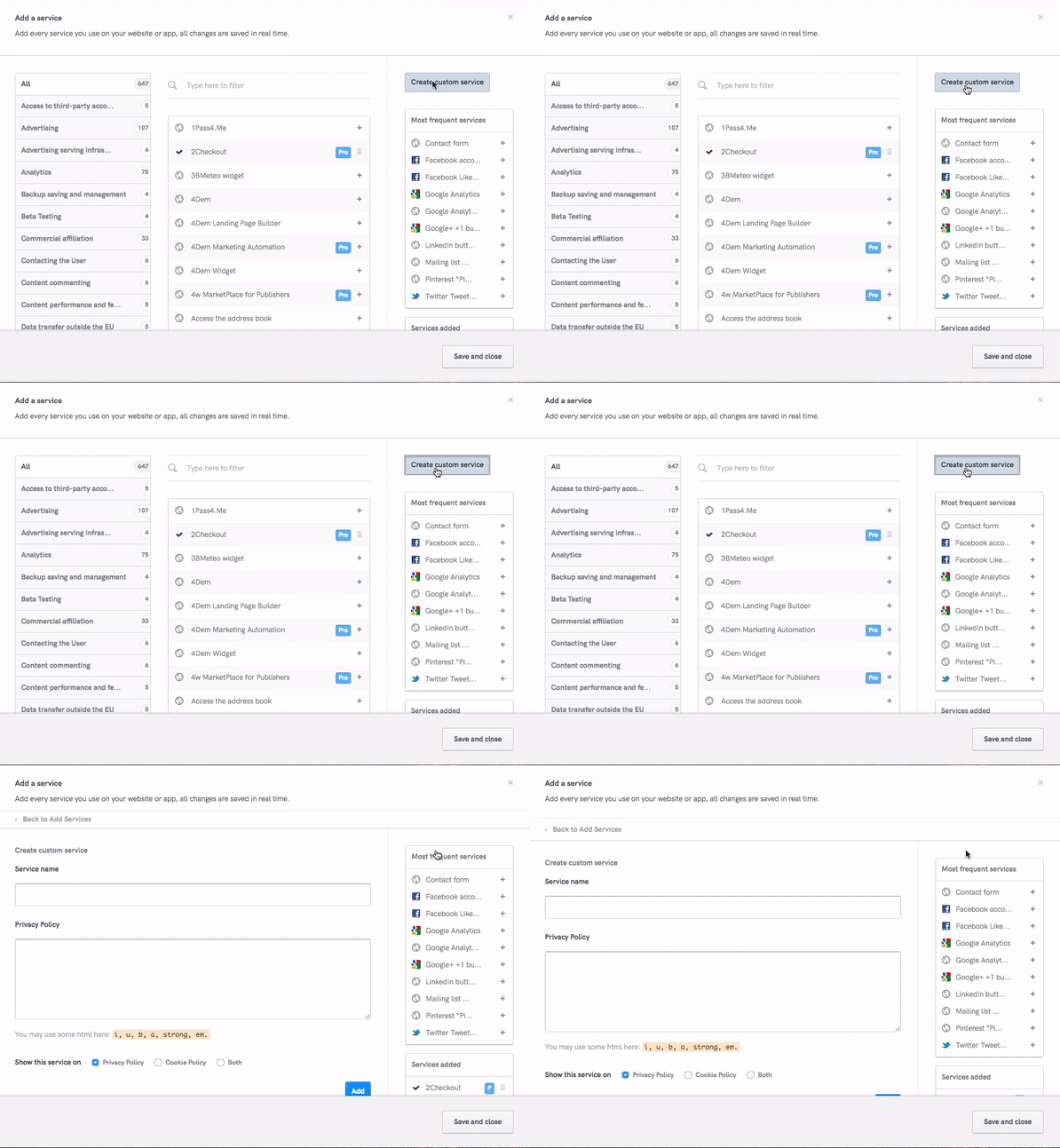
- If you use Twitter or other auth (=OAuth) services for user management, then add the respective service by clicking “Add a service” then start typing the name of the service you’d like to add. Remember to include all services processing personal information. If you handling user registration yourself, don’t forget to add the “Direct Registration” service.
- Select each applicable service from the list of suggestions that show up and customize by simply adding the specific types of personal data you collect. Our lawyer-crafted clauses automatically include the relevant user-rights disclosures and service definitions based on your input here.
- If you’d like to add a custom service clause, simply click the “Create custom service” button and fill out the built-in form.
2. Vul de eigenaar- en contactgegevens van je app in.
Vul het volgende in:
- name and full address;
- email address.
Dat is alles! Je privacybeleid is klaar. Controleer nog eens of alle gegevens kloppen, en sluit je beleid in op je site en app.
3. Insluiten
Zoals eerder gezegd, moet je een eenvoudig toegankelijke link naar je privacybeleid opnemen in de app zelf en in het App Store Connect-metagegevensveld.
In de app
For apps, the direct link or direct text embedding methods are best. Apple specifically requires “a link” to the privacy policy, so the direct link method is sufficient in meeting Apples’s requirements, however if your app processes user data while offline, be sure to provide users with an in-app offline method of accessing the privacy policy in order to be legally compliant.
Welke insluitmethode je ook kiest, onthoud dat je een locatie moet kiezen die gemakkelijk te raadplegen en zichtbaar is voor gebruikers.
App Store Connect-metagegevensveld
When your app is ready, you have 2 options to choose from: you can either beta test it by using TestFlight or submit it for review. In both cases – in addition to the app’s internal link – you’ll have to include a link to your privacy policy in the App Store Connect metadata field. Here’s how to meet this requirement:
TestFlight Beta Testing
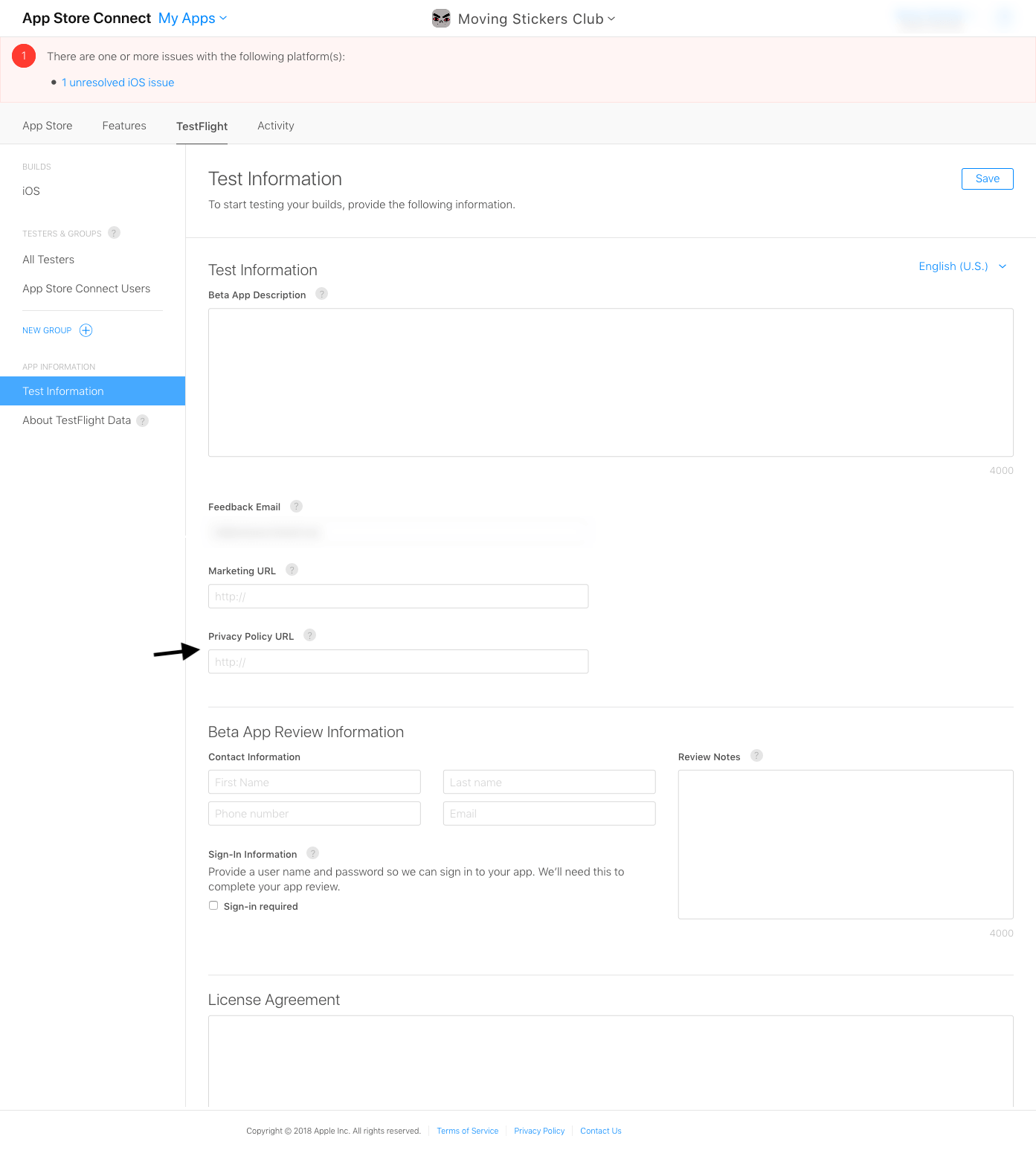
In App Store Connect, under “My Apps > TestFlight”, you will find “Test Information”, among which you will also find the privacy policy URL. Fill in the url for the translated privacy policy for each language that your app is translated into (iubenda offers 9 privacy policy languages out of the box):
App-inzending
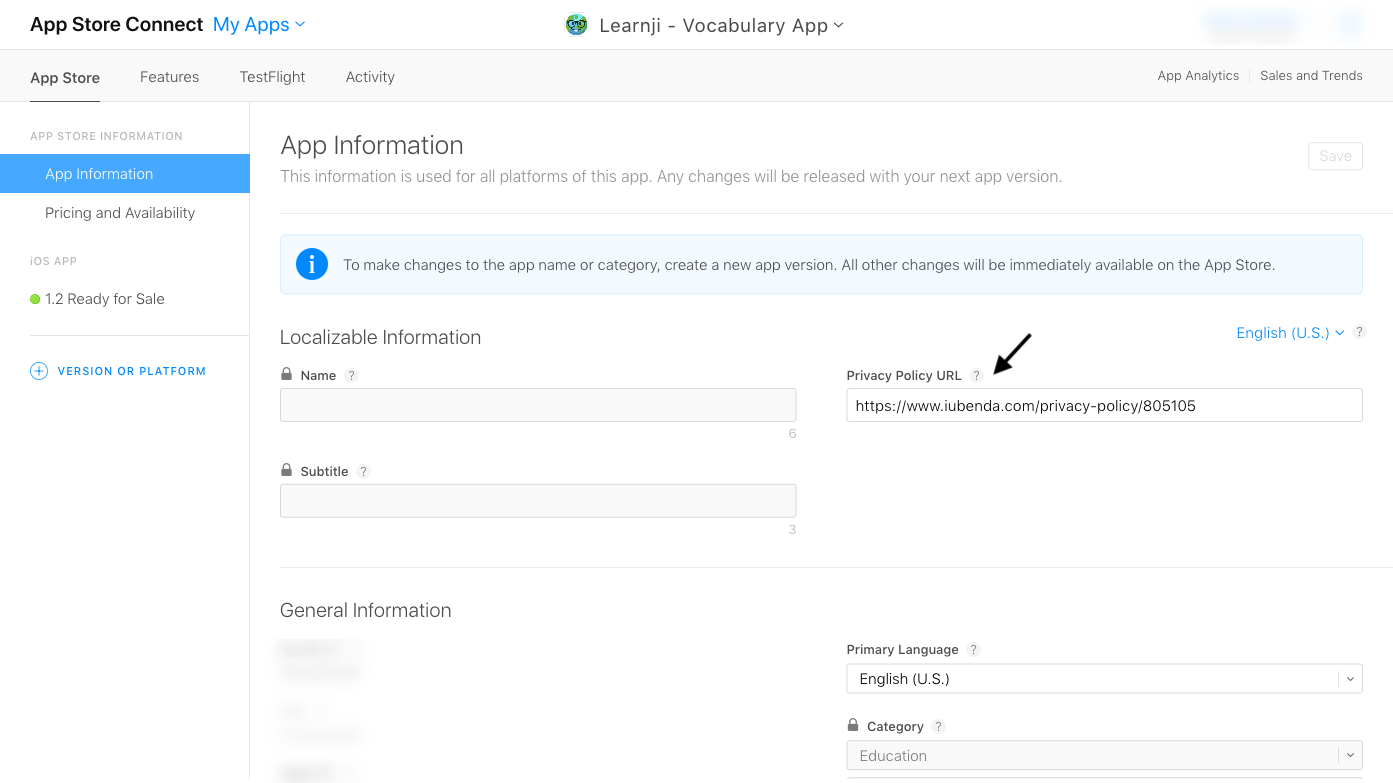
In App Store Connect, under “My Apps > App Store”, you will find “App Information”, among which you will also find the privacy policy URL. As mentioned above, fill in a privacy policy URL for each language that your app is translated into:
Zodra je aanvraag is goedgekeurd, vind je het privacybeleid gelinkt onder “Informatie” op de landingspagina van de app, die de App Store voor je genereert: