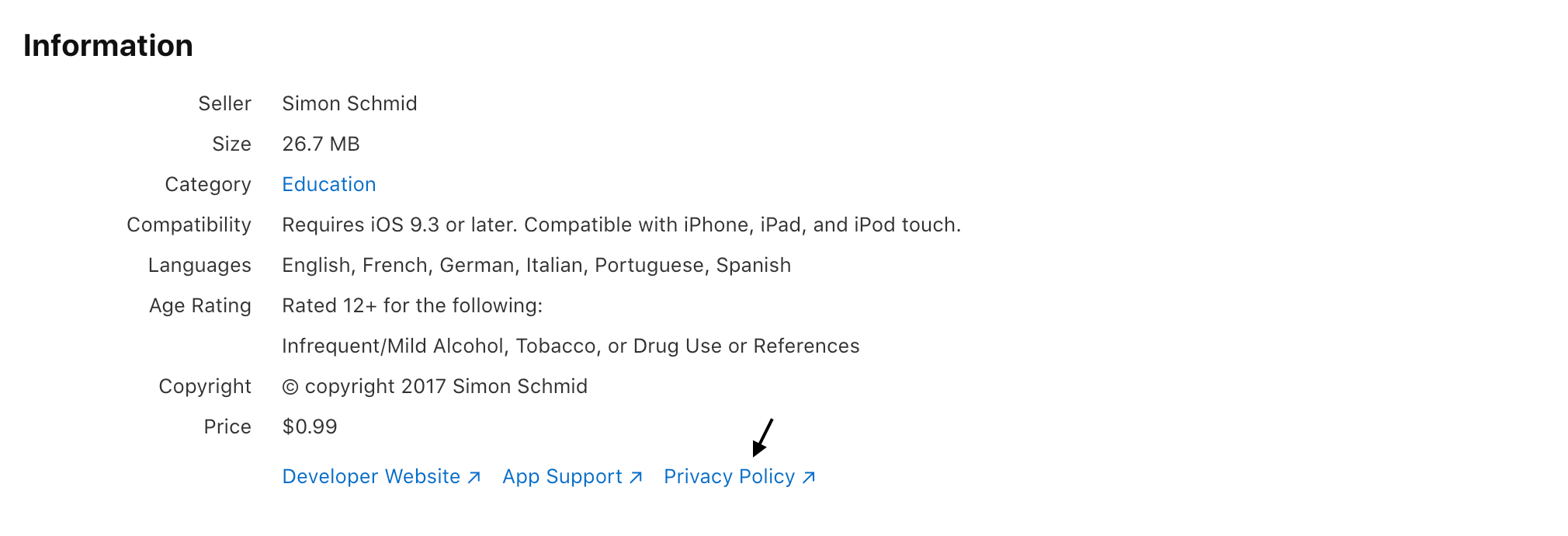

Desde el lanzamiento de iOS 8, Apple ha introducido muchos requisitos que deben cumplirse para evitar que tu aplicación sea rechazada. Uno de los principales (que suele implicar el rechazo de la aplicación en caso de incumplimiento) es el de la privacidad de los datos.
Data privacy is more important than ever across various companies and platforms; with major fines and sanctions being handed down for non-compliance, companies are paying attention – and Apple is no exception: Apple’s App Store Review Guidelines have been updated to better accommodate recent changes in Data Protection Law.
From October 3, 2018 App Store Connect requires a privacy policy for all new apps and app updates before they can be submitted for distribution on the App Store or through TestFlight external testing.
A partir del 3 de octubre de 2018, App Store Connect requiere una política de privacidad para todas las nuevas aplicaciones y actualizaciones.
El artículo 5.1 de las Pautas de revisión de la App Store de Apple proporciona una descripción general de las pautas de privacidad y los motivos de la negativa en caso de incumplimiento de estas condiciones. El artículo 5.1.1 sobre la recopilación y el almacenamiento de datos especifica lo siguiente:
5.1.1 (i) Política de privacidad: todas las apps deben incluir un enlace de fácil acceso a su política de privacidad tanto en el campo de metadatos de App Store Connect como dentro de la aplicación. La política de privacidad debe de forma clara y explícita:
- Identificar qué datos recopila la app/servicio, cómo los recopila y el uso que hace de ellos.
- Confirmar que cualquier tercero con quien una aplicación comparta sus datos (de acuerdo con estas pautas), como herramientas de análisis estadísticos, redes publicitarias y SDK, así como cualquier entidad matriz, subsidiaria o relacionada que tendrá acceso a los datos del usuario, proporcionará el mismo nivel de protección indicado en la política de privacidad de la app y requerido por estas pautas.
- Explicar sus políticas de conservación/eliminación de datos e ilustrar cómo un usuario puede retirar su consentimiento y/o solicitar la eliminación de sus datos.
Además, el enlace o el texto de la política de privacidad solo se podrá editar cuando envíes una nueva versión de tu aplicación. Lee la cláusula de privacidad de la App Store aquí.
Starting with iOS 14.5, new requirements will go into effect, that will make data collection and processing more transparent for users. You must:
- Answer privacy questions in App Store Connect, to explain how you handle users’ data and which third-parties are involved. This will provide users with relevant information on:
- the types of data you or third-party partners collect, unless the data meets all the criteria for optional disclosure;
- how their data may be used;
- your privacy policy.
- Use the AppTrackingTransparency framework to obtain the users’ permission to track them or to access their device’s advertising identifier. The AppTrackingTransparency framework will:
- Present an app-tracking authorization request to the user: the prompt contains a purpose string that explains why you’d like to track the user.
- Provide the tracking authorization status. Unless you receive permission from the user to enable tracking, the device’s advertising identifier value will be all zeros (meaning that you cannot not track the user).
Requisitos de la política de privacidad para apps de iOS y macOS
Muchos usuarios solicitan ejemplos de políticas de privacidad para apps. El contenido requerido de una política de privacidad depende de la ley aplicable y puede tener que cumplir con requisitos más allá de los límites geográficos y las jurisdicciones legales.
For this reason, it’s always advisable that you approach your (legally mandated) privacy policy with the strictest applicable regulations in mind. You can read more about determining your law of reference here or read our in-depth Legal Overview Guide here.
Empecemos con los requisitos legales mínimos. Estos son los elementos fundamentales de una política de privacidad:
- Who is the app owner?
- What data is being collected? How is that data being collected?
- What is the Legal basis for the collection? (e.g consent, necessary for your service, legal obligation etc.) – This is more specifically related to the GDPR and EU Law, however, even if you fall outside of GDPR obligations, it’s likely that under many other legislations, you’ll still need to say why you’re processing the personal data of users.
- For which specific purposes are the data collected? Analytics? Email Marketing?
- Which third parties will have access to the information? Will any third party collect data through widgets (e.g. social buttons) and integrations (e.g. Facebook Connect)?
- What rights do users have? Can they request to see the data you have on them, can they request to rectify, erase or block their data? (under European regulations most of this is mandatory)
- Description of process for notifying users and visitors of changes or updates to the privacy policy
- Effective date of the privacy policy
Ejemplo de política de privacidad para apps de iOS/macOS
Here’s an example of privacy policy for an iOS app, created with our generator.
Terms and Conditions for Mobile Apps
Terms and Conditions (also called ToS – Terms of Service, Terms of Use or EULA – End User License Agreement) set the way in which your product, service or content may be used, in a legally binding way. Not only are crucial for protecting you from potential liabilities, but (especially in cases where something is being sold to consumers) they often contain legally mandated information such as users’ rights, withdrawal or cancellation disclosures.
In general, you’ll likely need to set Terms and Conditions if you have an app that participates in some form of commerce (whether selling to users directly or facilitating trading). Additionally, some specific instances where they might be needed are where you:
- need to make legally required disclosures related to consumer rights (especially withdrawal and cancellation rights);
- have different user levels (eg. registered vs non-registered);
- your platform allows users to sell or trade with other users;
- facilitate or otherwise process payments and/or other sensitive user data;
- want to set the rules for user behavior and state grounds for termination of accounts;
- participate in affiliate programs;
- provide a software or service which can potentially cause harm if misused;
- would like to have some legally enforceable control over, and set rules about, how your app may be used.
Particular emphasis should be given to account termination clauses, payment conditions and the limitation of liability clauses (and disclaimers).
Our Term and Conditions Generator helps you to easily generate and manage documents that are engineered to meet the specific requirements of all major app stores and up to date with the main international legislations.
Cómo agregar una política de privacidad a tu app de iOS/macOS
iubenda makes solving this issue easy: With hundreds of available clauses, our privacy policies contain all elements commonly required across many regions and services, while applying the strictest standards by default – giving you the option to fully customize as needed.
Nuestras políticas son creadas y supervisadas por nuestros abogados, y se alojan en nuestros servidores para garantizar que estén siempre actualizadas con los últimos requisitos legales y de terceros.
El proceso es sencillo e intuitivo, simplemente:
- click to add your services;
- fill out your web/app owner and contact details;
- embed.
Click here to read the full guide on how to generate a Privacy Policy.
1. Añade tus servicios
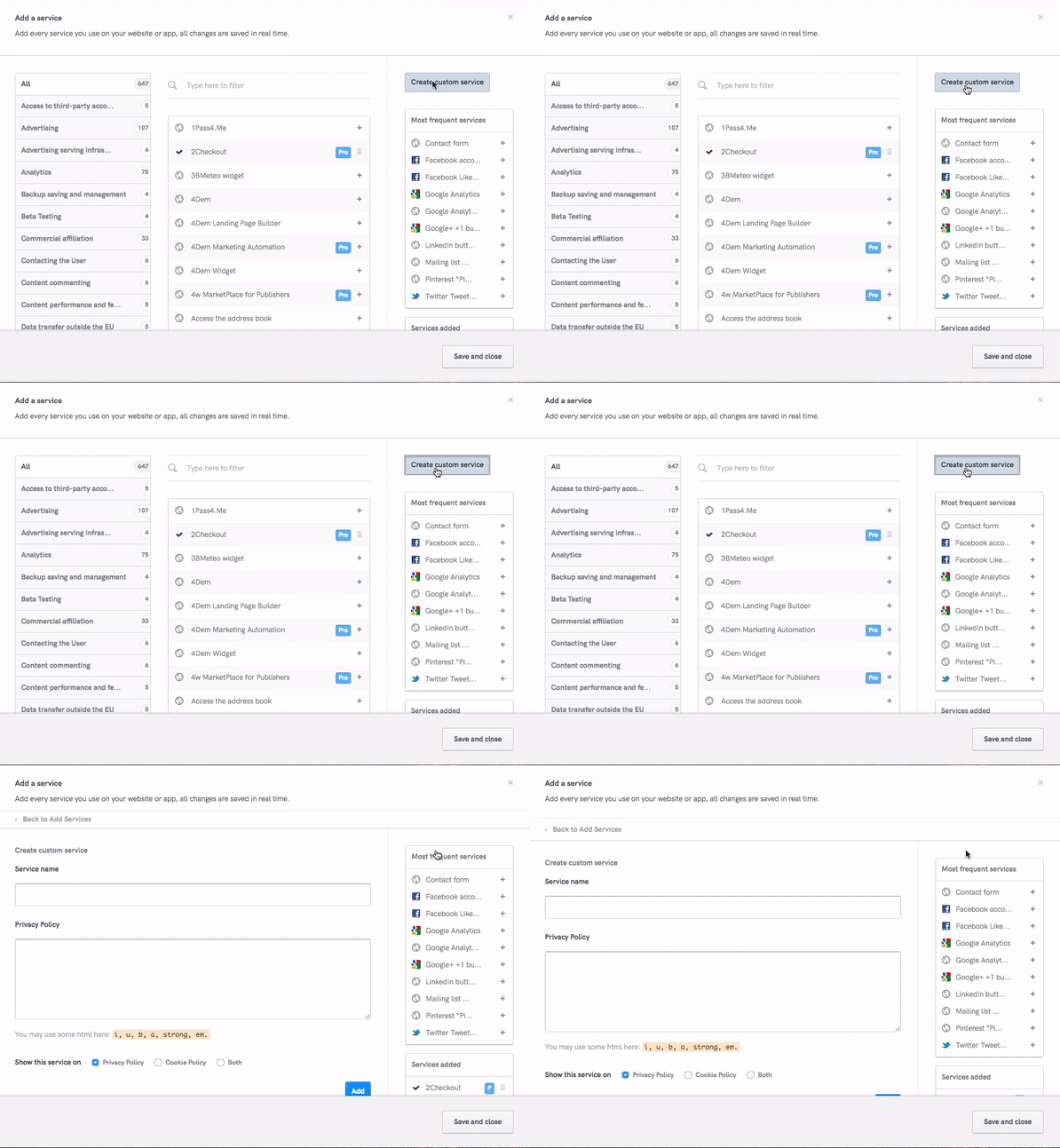
- If you use Twitter or other auth (=OAuth) services for user management, then add the respective service by clicking «Add a service» then start typing the name of the service you’d like to add. Remember to include all services processing personal information. If you handling user registration yourself, don’t forget to add the «Direct Registration» service.
- Select each applicable service from the list of suggestions that show up and customize by simply adding the specific types of personal data you collect. Our lawyer-crafted clauses automatically include the relevant user-rights disclosures and service definitions based on your input here.
- If you’d like to add a custom service clause, simply click the «Create custom service» button and fill out the built-in form.
2. Completa los datos del titular y de contacto
Introduce:
- name and full address;
- email address.
¡Felicidades! Has creado tu política. Ahora, simplemente tienes que revisar que todos los datos son correctos y después integrarla en tu app.
3. Integra
Como hemos dicho anteriormente, debes incluir un enlace a la política de privacidad tanto en el campo de metadatos de App Store Connect como dentro de la propia aplicación.
Dentro de la app
For apps, the direct link or direct text embedding methods are best. Apple specifically requires «a link» to the privacy policy, so the direct link method is sufficient in meeting Apples’s requirements, however if your app processes user data while offline, be sure to provide users with an in-app offline method of accessing the privacy policy in order to be legally compliant.
Independientemente del método de integración que elijas, recuerda que estás obligado a elegir una ubicación que sea fácilmente accesible y visible para los usuarios.
Campo de metadatos de App Store Connect
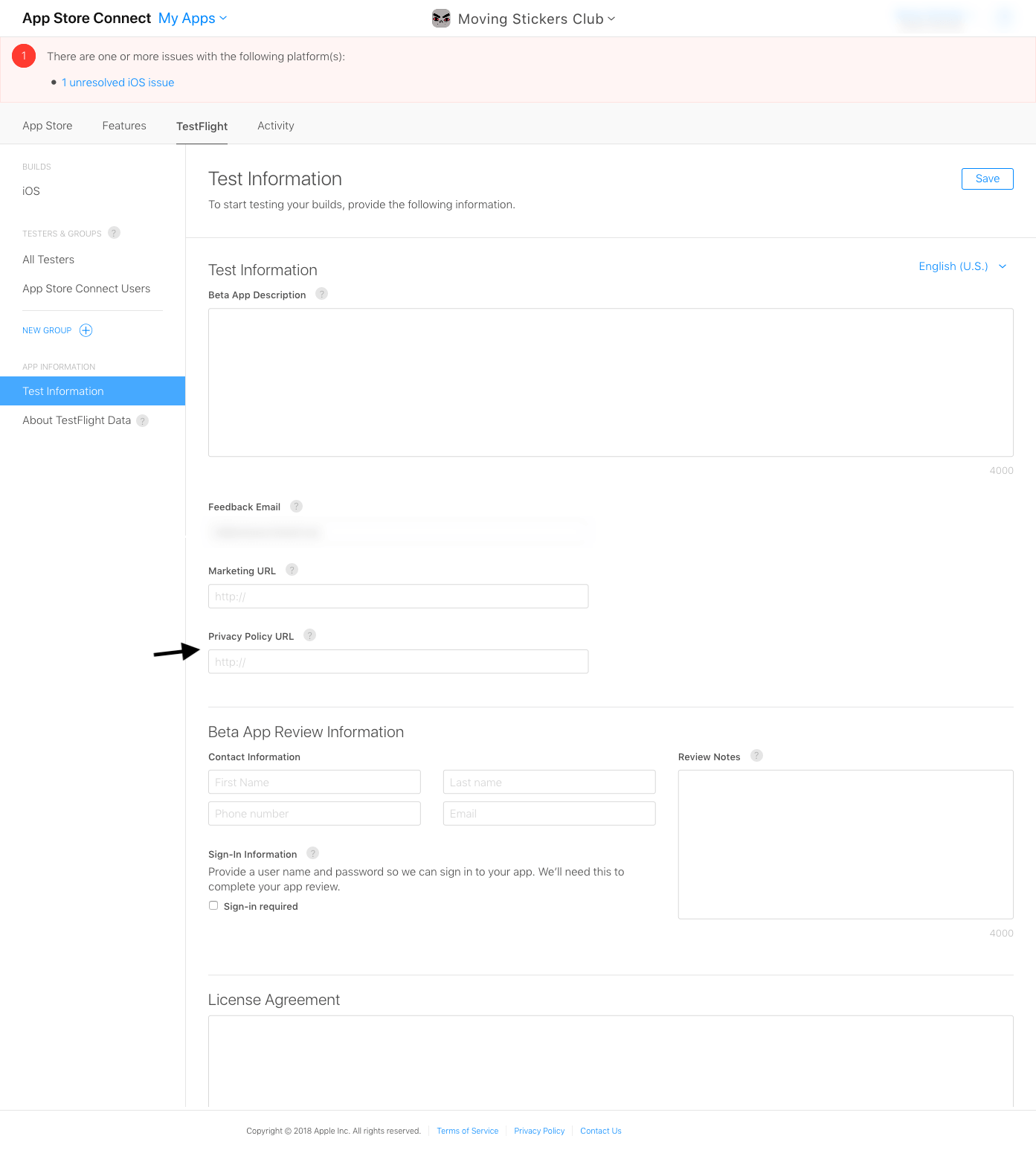
When your app is ready, you have 2 options to choose from: you can either beta test it by using TestFlight or submit it for review. In both cases – in addition to the app’s internal link – you’ll have to include a link to your privacy policy in the App Store Connect metadata field. Here’s how to meet this requirement:
Prueba beta de TestFlight
In App Store Connect, under «My Apps > TestFlight», you will find «Test Information», among which you will also find the privacy policy URL. Fill in the url for the translated privacy policy for each language that your app is translated into (iubenda offers 9 privacy policy languages out of the box):
Envío de la app para su revisión
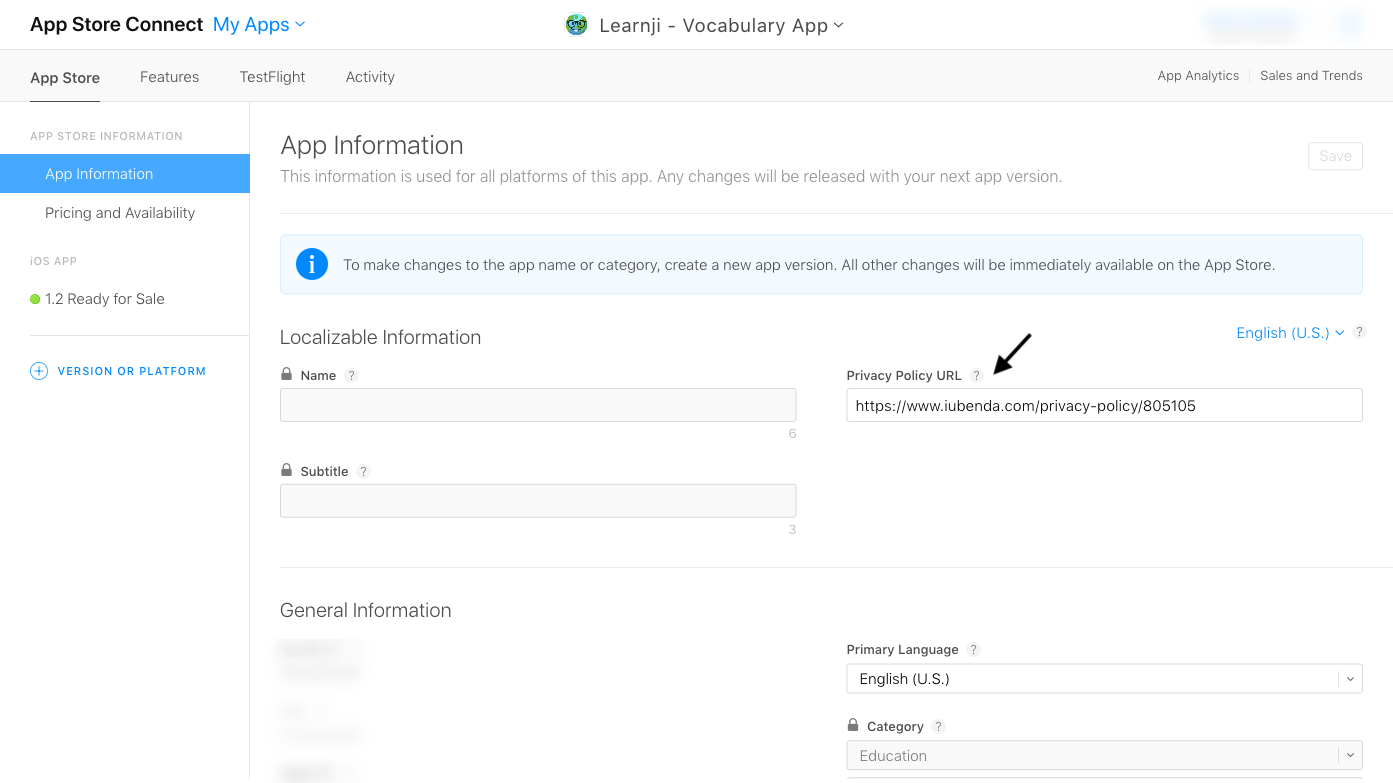
In App Store Connect, under «My Apps > App Store», you will find «App Information», among which you will also find the privacy policy URL. As mentioned above, fill in a privacy policy URL for each language that your app is translated into:
Una vez que tu aplicación haya sido aprobada, encontrarás el enlace a la política de privacidad en «Información» en la página de inicio de la aplicación generada por la App Store: