

The IAB Transparency and Consent Framework (TCF) is a set of technical specifications and policies that assist publishers in displaying ads on their websites, helping them to comply with the GDPR and the ePrivacy Directive.
The deadline to implement the most recent version (2.3) is February 28, 2026.
Timeline
iubenda, as a Certified Consent Management Platform, is fully on board with TCF 2.3.
Here’s a brief timeline of important dates:
- 19th June 2025
TCF 2.3 is released and iubenda supports it from this date. You can manually settcfVersionto 2.3 in your Privacy Controls and Cookie Solution to start sending updated signals now. - 28th February 2026
End of the Implementation Period. After this, TCF v. 2.2 signals won’t be valid for new consents. iubenda will automatically switch all configurations to TCF v. 2.3.
How to enable TCF 2.3 with iubenda
Choose one of the two methods below to activate TCF v. 2.3:
Method 1 (preferred) – Use iubenda’s Privacy and Cookie Policy Generator
- Go to your dashboard: Click on the site/app you want to update.
- First, select the TCF-related vendors in the services modal of the Privacy and Cookie Policy Generator, our scanner should suggest them to you (alternatively, you can find them in the “Advertising” category).
- Next, go to the Privacy Controls and Cookie Solution configurator.
- Activate the “IAB TCF” tile (if it’s not already enabled) and click “Edit”.
- Choose version “TCF v. 2.3”.
- Save and update the cookie banner integration code on your site.
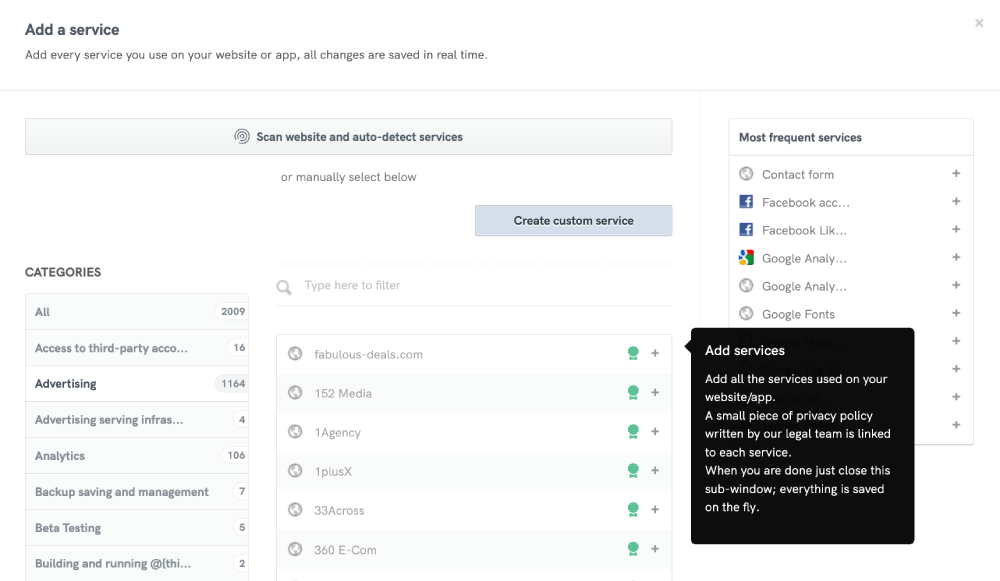

💡 The Privacy Controls and Cookie Solution updates automatically with any addition or removal of any TCF service on the Privacy and Cookie Policy. Subsequently, the Configurator will display the number of providers added, and the banner will adjust its display, affecting the TCF panel accordingly.
Need a different method? Expand for Manual Vendor Insertion:
Method 2 – Manual Vendor Insertion
If you prefer a manual setup:
- Go to your Dashboard and click on the site/app you want to update.
- Select the option labelled “Manually enter the list of TCF vendors you want to display”.
- Input the specific vendor IDs, separating each with a comma (check the Global Vendor List and the additional vendor information list to get accurate vendor IDs and details).
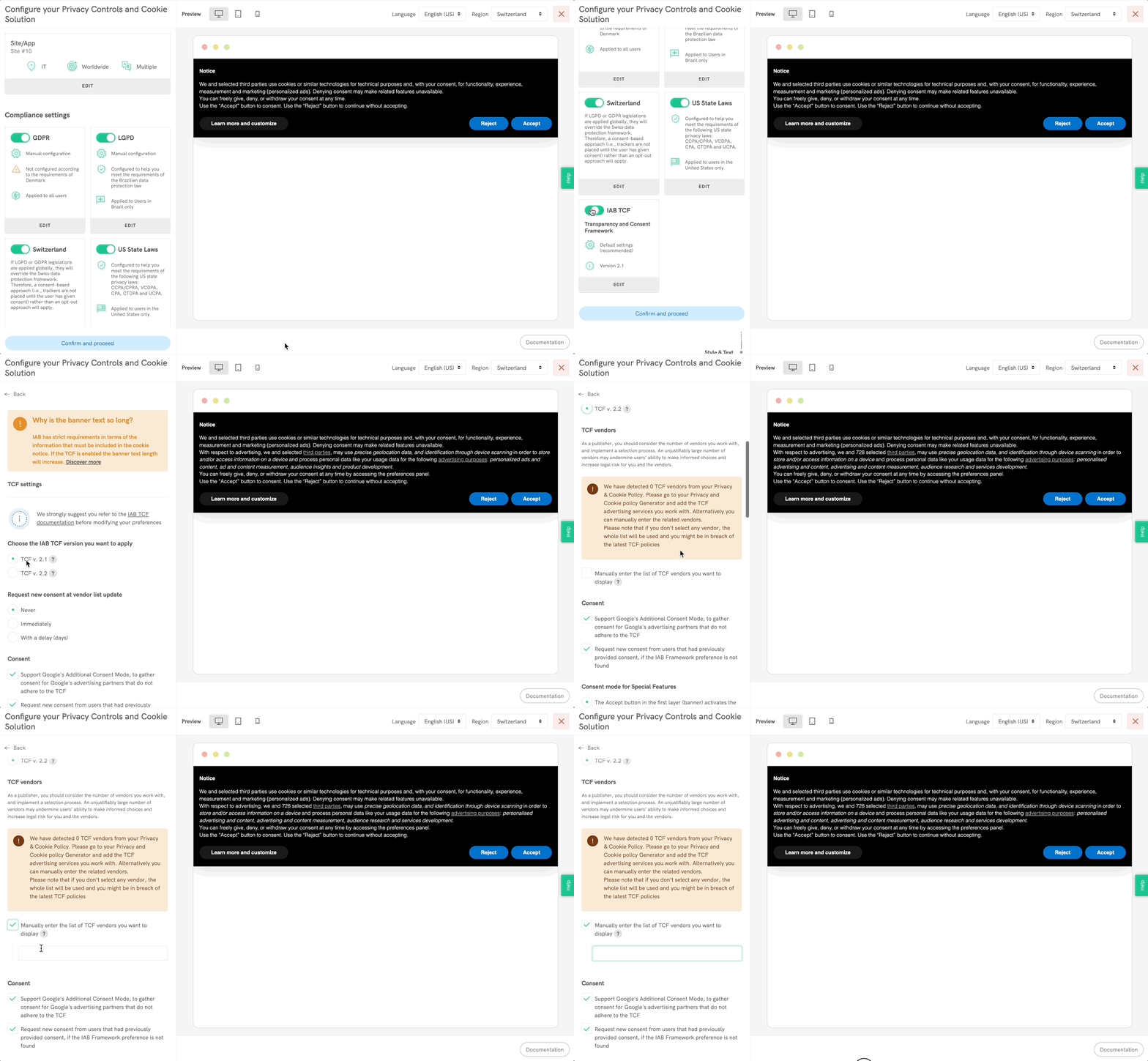
- Save and update the cookie banner integration code on your site.
Additional Notes
- To activate TCF 2.3 before the deadline, manually set
tcfVersionto 2.3 in your configuration. After February 28, 2026, iubenda will automatically switch all configurations to TCF v. 2.3. - The Privacy Controls and Cookie Solution will auto-update when you add or remove any TCF service.
- If TCF v. 2.3 is activated but no TCF vendors are found, iubenda will display an alert.
- Without selecting specific vendors, the system might display all TCF vendors. This blanket display could inadvertently breach TCF policies, so be cautious and intentional in your selections.
- If you’ve customized the text of your cookie banner, please review the IAB guidelines and contact us for verification.